Workflow comparison · Verified 2026-08-25

Retake Design vs Adobe Express for multi-channel campaigns

Compare Adobe Express’s broad content, Adobe ecosystem, resize, and publishing surface with Retake’s reviewed brief-to-editable-Campaign-Set workflow.

Quick answerChoose Adobe Express for a mature cross-device creation and publishing companion. Choose Retake when every channel output needs its own native layout inside one reviewed campaign document.
Compared with

Adobe Express

Create and publish
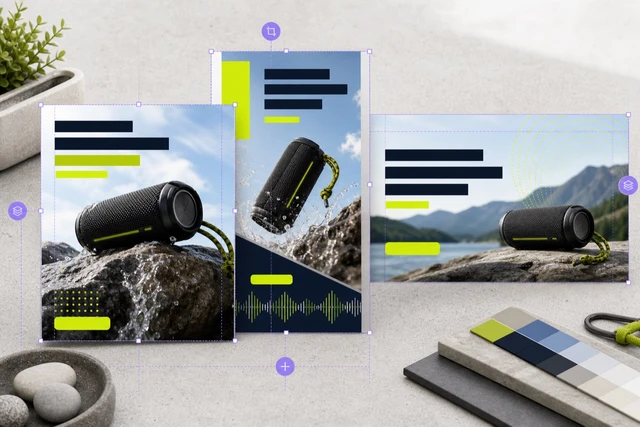
Outdoor audio campaign recomposed as distinct square, Story, and banner layouts
Retake DesignCampaign Set with layers
Choose by outcomeEcosystem or document control

Choose Adobe Express when…

  • Your assets, fonts, or production process already depend on Adobe products.
  • Quick Actions, templates, video, resize, scheduling, and cross-device work are immediate requirements.
  • You need team administration and integrated publishing, which Retake does not currently offer.

Choose Retake when…

  • You want a Result Skill to declare the exact formats and inputs before generation.
  • You distinguish channel re-layout from one-click resizing and want each design to preserve its own crop and hierarchy.
  • You want Agent proposals, Brand changes, and Campaign Sets to enter one typed, undoable document history.

At a glance

Compare the unit of work and the handoff.

The important difference is not who has the longest feature list. It is where work starts, what remains editable, and what the next person receives.

Decision pointAdobe ExpressRetake Design
Starting pointTemplate, Quick Action, or existing Adobe assetBrief, Result Skill, or native Template recipe
Channel adaptationResize, duplicate-and-resize, and format toolsIndependent channel design with shared campaign direction
Creative ecosystemAdobe Fonts, Stock, Firefly, and Creative Cloud linksBuilt-in fonts, reusable Assets, Brand Kits, and AI editing
PublishingContent Scheduler and social publishing optionsExport designs for publishing elsewhere; no built-in scheduling
Review modelExpress project and collaboration workflowsRead-only proposal before one document-command apply
Best current fitAdobe-connected creators and marketing teamsA focused editable multi-format campaign handoff

Why choose Retake

Choose it for the document you need after AI runs.

Retake is intentionally narrower: the Agent, generated assets, native Canvas, Versions, and export checks all converge on one editable marketing document.

  • Treat resize as re-layoutA Story can use a larger subject and shorter copy while a Feed design carries denser proof.
  • Make the output contract visibleA Result Skill names placements, required facts, output formats, and readiness before execution.
  • Keep provider output as an AssetGenerated bytes enter the immutable Asset repository before an ImageLayer references them.
  • Preserve one document authorityAgent, Template, Brand Kit, and workflow results all compile through Document Commands.
  • Compare candidates before selectionGenerated variants stay immutable until the user selects the exact candidate for one ImageLayer.
  • Deliver exact dimensionsExport projects each requested design at native size without changing the active Canvas.

Where Adobe Express wins

Retake is not the answer to every workflow.

  • Retake does not bundle Adobe Stock, Adobe Fonts, Firefly, or Creative Cloud integrations.
  • Video creation, social scheduling, and shared team controls are not currently available in Retake.
  • Adobe Express is stronger for teams standardized on Adobe identity, assets, and publishing.

Decision guide

Test the actual work.

  1. 01

    Audit ecosystem dependency

    List the Adobe files, fonts, libraries, and publishing destinations your team relies on.

  2. 02

    Compare re-layout quality

    Inspect whether each channel preserves the promise, subject, crop, and CTA at its real reading distance.

  3. 03

    Inspect approval and rollback

    Check how a large AI or brand change is previewed, applied, undone, checkpointed, and restored.

Use them together

A comparison does not require a forced migration.

Keep specialist or mature ecosystem capabilities where they work, and make the handoff into Retake explicit when native campaign structure adds value.

  1. 01

    Prepare source assets in Adobe

    Finish licensed photography or advanced source editing where your team already has the right tools.

  2. 02

    Import approved bytes into Retake

    Register the exact Assets, then build channel-specific designs around native copy and shapes.

  3. 03

    Export reviewed campaign designs

    Deliver exact PNGs with a manifest, then use your established scheduler when required.

Sources and method

Claims you can inspect.

Official sources support product capability statements. Independent review signals summarize recurring user or reviewer observations; they are context, not controlled benchmarks.

Official product source

Adobe Express Resize ↗

Adobe documents Resize, Duplicate & Resize, custom sizes, presets, and generative expansion.

Independent review signal

TechRadar Adobe Express review ↗

The review positions Express as an all-in-one content marketing hub with social, generative, and template workflows.

Verified 2026-08-25. Retake capability statements describe the current implemented product boundary and explicitly mark deferred surfaces. Product names and marks belong to their respective owners; this independent comparison does not imply endorsement or affiliation.

FAQ

Keep the comparison honest.

Does Retake include Adobe Stock or Firefly?

No. Retake keeps external providers behind server adapters and does not claim Adobe asset or model access.

Can Retake schedule social posts?

No. The current product prepares and exports reviewed campaign designs; scheduling is deferred.

Why use a Campaign Set instead of only Resize?

A Campaign Set gives each placement its own hierarchy and crop while preserving the shared direction and editability.